
Your Cart is Empty


Get a Personalized Quote×
Overview
RapidFire Lite is the first email enabled collaboration tool designed to ease the sharing and interpretation of 2D and 3D product design data. It is a standalone viewer that allows users to publish files as read only and ultra compact (up to 95% compression) eDrawings files for visualization, collaboration and design review. View, publish and share exact read-only representations of STEP/STP, IGES/IGS, STL and DWG, DXF for design review and collaboration. |
 |
Features and benefits
 |
 |
 |
|
IGES, IGS, STP, STEP, OBJ, STL, SketchUp support View, print, publish and share your STEP (*.stp, *.step), IGES (*.igs, *.iges), OBJ (*.obj), STL (*.stl), SketchUp (*.skp) model files for design review and collaboration. |
DWG, DXF file support View, print, publish and share your DWG (*.dwg), DXF (*.dxf) files. |
Dynamic Cross-section View cross sections of part and assembly files by creating a variety of cross section planes. |
 |
 |
 |
|
Measurement Use the Measure tool to measure exact dimensions in part, assembly, and drawing files. |
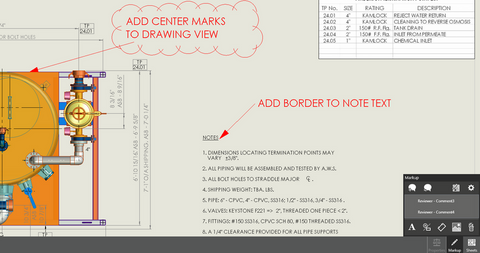
Markups Add markup elements, such as geometric elements, clouds, text, or dimensions to the comment using the markup tools. |
3D data in Drawings Visualize drawings more effectively by exporting 3D shaded data in drawing files. |
 |

|
 |
|
Mass Properties Query Mass, Volume, Density (parts only), and Surface area of the model. |
Batch Publish Convert multiple CAD files to eDrawings. |
Save as STL, Image formats eDrawings can be optionally exported by the eDrawings Viewer as STL files. |
 |
 |
 |
|
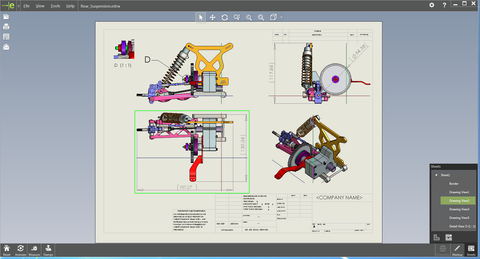
Layouts Open individual views in a drawing and arrange them in any way you desire. Align the views intelligently and enable the eDrawings recipient to print and export any subset of a drawing. |
3D Pointer Easily identify and match geometry in multiple views using the 3D Pointer. |
Insert Stamps Insert your company logos and images as stamps in the eDrawings file. |
 |
 |
 |
|
Animation Demonstrate how drawing views relate to each other. With the click of a button eDrawings animates all the views contained in your drawing. |
Data Protection Password protect eDrawings, disable measurement and STL export to protect sensitive data. |
View 3D Annotations eDrawings recipients can view 3D annotations. |
