
Your Cart is Empty


Advanced Surface Modeling for Premium Consumer Product Design
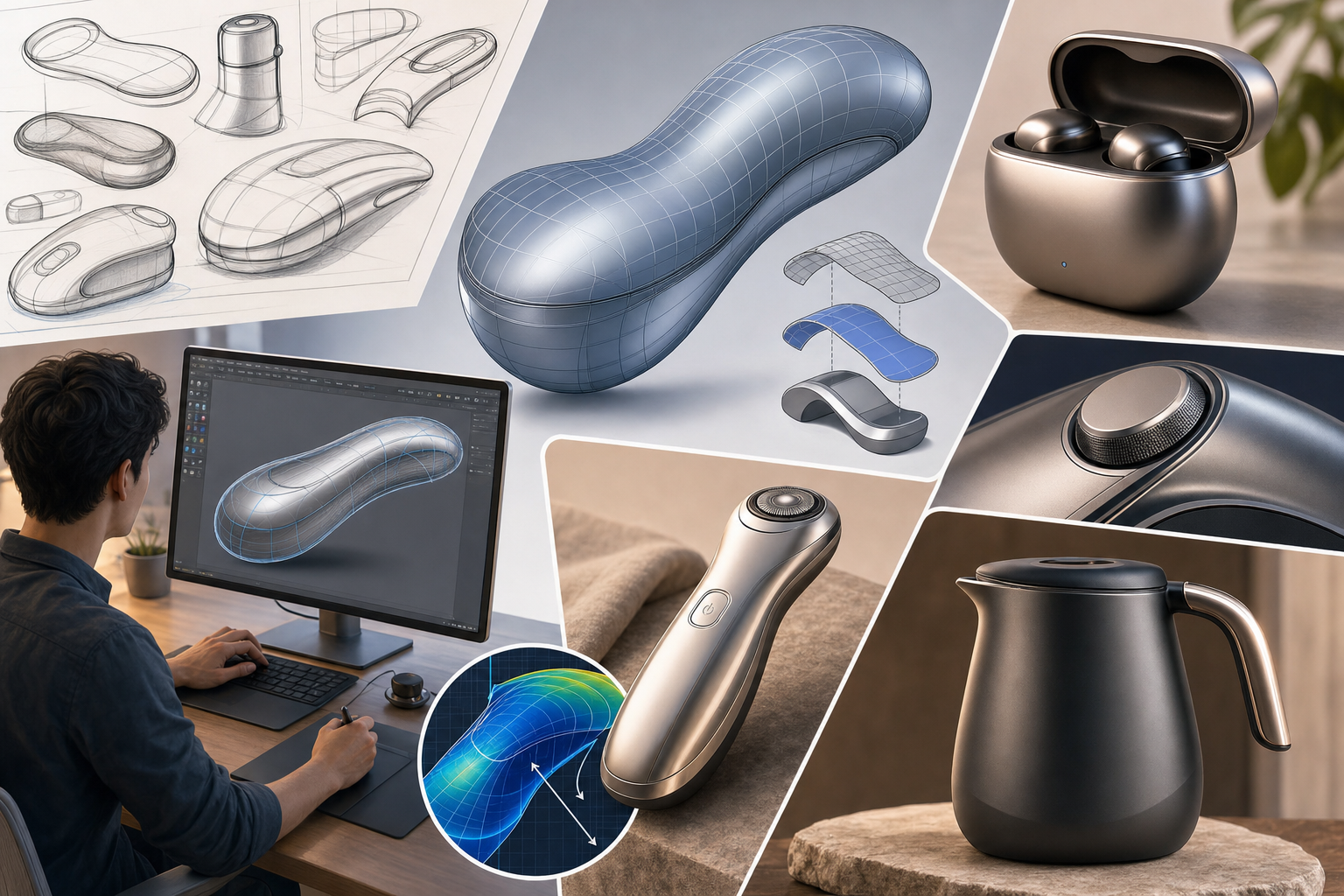


Consumer product design rarely succeeds on utility alone. The products people choose to carry, wear, display, and repeatedly interact with must communicate quality before they are ever evaluated for performance. That communication happens through proportion, light behavior, edge transitions, tactile intent, and the subtle visual logic of a form. In that context, advanced surface modeling remains one of the most important capabilities in modern design software because it gives teams control over how a product is perceived at every scale, from the silhouette on a retail shelf to the highlight line that travels across a curved housing under studio lighting.
Why Surface Modeling Still Defines High-Value Consumer Products
Consumer products demand far more than geometry that simply encloses components or satisfies dimensional requirements. A speaker, wearable device, kitchen appliance, handheld tool, or premium electronics enclosure must resolve emotional appeal, manufacturability, hand comfort, material transitions, and visual brand language within the same formal system. Traditional solid modeling is extremely effective for engineering features such as bosses, ribs, holes, wall thickness control, and assembly relationships, but it often becomes restrictive when a design process begins with expressive shape exploration rather than feature definition. That is where advanced surface modeling becomes central. It allows designers to build form deliberately from curves, patches, continuity constraints, and reflection-driven evaluations rather than from strictly volumetric operations.
Beyond Functional Geometry
In form-driven workflows, the goal is not just to make geometry valid but to make it visually coherent under changing conditions of light, perspective, and use. A consumer product may technically function with a crude outer shell, yet still fail because the transitions feel abrupt, the grip areas appear unresolved, or the brand signature lines lack refinement. Surface modeling addresses these issues by enabling precise control over continuity and curvature behavior. A well-crafted surface is not merely smooth in a casual sense; it is mathematically organized so highlights move predictably and adjacent regions feel intentionally connected. This matters especially in premium products where users unconsciously associate smooth reflection flow and balanced edge tension with quality. Industrial designers use surface tools to create differences users may not describe verbally but notice immediately, such as whether a corner feels soft rather than swollen, or whether a feature line looks crisp rather than accidental.
Surface Quality as a Medium for Brand Identity and Ergonomic Intent
One of the most compelling reasons surface modeling remains indispensable is that it lets industrial designers encode brand identity directly into geometry. Brands are often recognized not by logos alone but by recurring formal characteristics: a controlled shoulder line, a distinctive crown surface, a tension between soft and sharp transitions, or a disciplined use of highlight breaks. These traits are difficult to produce consistently through basic solid features because they depend on nuanced continuity management across larger surface systems. Surface-based workflows are especially effective when designers need to establish a family resemblance across product lines while adapting form factors to different sizes, interfaces, or internal packaging constraints.
Ergonomics Through Surface Logic
Ergonomic intent also depends on advanced surfacing more than many engineering-centered workflows acknowledge. Human interaction is guided by curvature, not just dimensions. The difference between a device that sits naturally in the palm and one that feels awkward often lies in transitional surfaces that distribute pressure, support finger placement, and visually suggest interaction zones. Surface modeling allows a designer to coordinate tactile and visual behavior so the product appears comfortable before it is touched and confirms that promise during use. In practice, designers rely on surfacing to shape grip bulges, thumb rests, perimeter transitions, and visual thinning strategies that make an object look lighter, smaller, or more approachable without compromising internal volume. This means the visible form is not styling added after engineering; it is a structured response to usability, perception, and manufacturing realities. That integrated role is exactly why advanced surface modeling remains central rather than optional in consumer product development.
Class-A Surfacing and the Discipline of Continuity Control
At the highest level of product refinement, Class-A surfacing represents a discipline focused on visual perfection, especially for exposed surfaces where reflections reveal every deviation. While not every consumer product requires automotive-grade Class-A treatment, the underlying principles increasingly influence premium design workflows across electronics, home products, mobility accessories, and wearables. The key concept is continuity control. Designers must decide how one curve or surface segment transitions into another and what degree of smoothness is visually and functionally appropriate. This is not an abstract mathematical concern. Continuity directly affects whether a product reads as crisp, calm, technical, organic, or luxurious.
Understanding G0 Through G3
The most common continuity framework includes:
- G0 continuity, where surfaces simply meet at an edge or point
- G1 continuity, where tangency is aligned for smoother directional flow
- G2 continuity, where curvature is also matched, reducing visible breaks in highlight movement
- G3 continuity, where the rate of curvature change is coordinated for exceptionally refined transitions
Reflection Analysis as a Design Decision Tool
Advanced surfacing is impossible to judge by shaded geometry alone. Designers working on high-value forms depend on diagnostic methods that reveal how mathematically smooth a surface actually is and how it will behave under realistic lighting. Three of the most important tools are curvature combs, zebra stripes, and reflection analysis environments. These are not merely validation features added after modeling; they actively shape design decisions throughout the process. Curvature combs expose the change in curvature along curves, helping designers detect flat spots, sudden spikes, waviness, or inconsistent transitions before those issues propagate into surface patches. Zebra stripes simulate reflected bands across connected surfaces, making continuity breaks immediately visible through distorted or misaligned stripe flow.
From Visual Feedback to Corrective Action
Reflection analysis extends this idea further by placing the model in controlled visual conditions where highlight movement can be studied across the product as a whole. For consumer products with glossy plastics, coated metals, anodized finishes, or painted housings, this level of inspection is critical because imperfections that seem minor in CAD often become glaring in physical production. Skilled designers use these tools iteratively:
- Adjusting control points to calm unstable highlight regions
- Rebuilding curves when a patch is inheriting poor inputs
- Changing patch boundaries to improve downstream blend stability
- Rebalancing edge sharpness against reflection smoothness
SubD and Hybrid Modeling for Faster Form Exploration
Modern workflows increasingly combine traditional surface construction with subdivision modeling, often referred to as SubD, to accelerate concept development without sacrificing downstream control. SubD tools allow designers to manipulate a cage-like mesh and generate smooth sculptural forms quickly, making them particularly effective during the early stages of consumer product development when proportion, stance, and character are still being explored. Compared with conventional NURBS surface construction, SubD can feel more fluid because designers push and pull form with a sculptural mindset rather than defining every patch relationship upfront. This supports faster iteration when evaluating multiple aesthetic directions or seeking a distinctive formal language under aggressive timelines.
From Sculptural Speed to Production Geometry
The challenge, historically, has been translating those expressive forms into geometry suitable for engineering, detailing, and manufacturing workflows. That is why hybrid environments have become so important. They allow teams to begin with broad sculptural exploration in SubD, then convert or rebuild selected areas into production-ready surfaces with controlled boundaries, continuity, and feature compatibility. This bridge is essential because consumer products typically move from open exploration to highly constrained development very quickly. Internal components, split lines, mechanical interfaces, draft requirements, and tooling direction all demand greater precision than a raw concept mesh can provide. Effective hybrid workflows now support:
- Localized conversion from SubD regions into editable surface patches
- Retention of design intent while refining edge conditions
- Progressive handoff from industrial design to engineering without total remodeling
- Combining sculptural primary form with precise parametric secondary features
Curve Network Construction as the Foundation of Stable Surface Systems
Behind almost every refined surface model is a disciplined curve framework. While surface tools often receive the attention, experienced designers know that poor inputs produce unstable surfaces no matter how sophisticated the software may be. Curve network construction is therefore one of the most important and least glamorous aspects of advanced surfacing. It involves defining master curves, guide rails, section profiles, and boundary relationships that establish the logic of the form before patch creation begins. In consumer product design, this is especially valuable because many products rely on a clear hierarchy: an overall silhouette, one or two dominant signature lines, supporting sectional changes for ergonomics, and local detailing that must remain subordinate to the primary form.
Master Curves and Surface Intent
Master curves often control the most recognizable aspects of the design, such as the top sweep of a device, the perimeter tension of a housing, or the side profile that communicates slimness or robustness. Guide rails and section curves then shape how volume evolves across the form. A stable curve network helps teams avoid common problems such as overbuilt patch layouts, inconsistent transitions, and surfaces that become difficult to edit late in development. Strong frameworks typically share several characteristics:
- Curve spans are intentionally minimized and balanced
- Control points are organized to avoid unnecessary waviness
- Primary curves are established before detail features are introduced
- Intersections are designed, not merely accepted as software output
- Surface boundaries align with functional and visual logic
Surface Refinement Operations That Turn Concepts into Production-Ready Models
Once the primary surface framework is established, refinement operations transform a compelling concept into geometry that can survive the realities of engineering and manufacturing. These operations include trimming, patching, blending, offsetting, extending, and healing. Although they may sound procedural, they are where many projects either maintain formal integrity or lose it. Trimming, for example, can be used intelligently to define part breaks and feature windows, but excessive trimming on unstable base surfaces often creates fragile topology that becomes difficult to modify. Patching can repair or reorganize areas around complex transitions, yet if used too late or too repeatedly it may mask deeper problems in the underlying curve structure.
Blends, Offsets, and Healing
Blending is especially critical in consumer products because edge transitions strongly influence visual softness, manufacturability, and tactile feel. A blend is not just a radius inserted between faces. In advanced workflows it is a tuned surface event that must respond to adjacent curvature, changing section conditions, and local design intent. Similarly, offsetting is not a trivial command when working with thin-walled enclosures or double-surface constructions for plastics, composites, and cast parts. Complex curvature can cause self-intersections, thinning, and broken offsets that require manual intervention or strategic surface reconstruction. Healing operations then become necessary to repair gaps, tolerances, trimmed-edge inconsistencies, and imported geometry issues before downstream teams can use the model confidently. Effective refinement often revolves around a few disciplined principles:
- Preserve the quality of primary surfaces as long as possible
- Use blends that respect highlight flow, not only target radius values
- Validate offsets early to avoid late-stage wall thickness surprises
- Heal imported or converted geometry before adding detail features
How Design Software Is Moving Toward Truly Hybrid Surfacing Environments
The evolution of design software over the last decade has been defined by convergence. Historically, industrial designers, mechanical engineers, and visualization specialists often worked in separate applications with different geometric assumptions and different priorities. Today, leading platforms increasingly combine parametric modeling, direct editing, and freeform surfacing in the same environment. This shift reflects the reality that consumer product development is no longer linear. Teams move repeatedly between concept exploration, mechanical packaging, surface refinement, and design validation. A rigid separation between solid modeling and freeform surfacing creates unnecessary remodeling, translation errors, and intent loss. Hybrid environments reduce those disruptions by allowing users to switch between history-based operations, direct manipulation, and high-control surface editing as needed.
Why Integration Matters in Practice
This integration changes behavior as much as capability. Designers can now test expressive outer forms without abandoning the possibility of structured downstream edits. Engineers can modify adjacent internal features while preserving critical exterior surfaces. Visualization teams can receive cleaner geometry earlier, which improves material presentation and helps identify form issues before prototypes are commissioned. The most effective hybrid systems support workflows such as:
- Editing imported geometry directly while rebuilding only critical aesthetic zones
- Driving certain dimensions parametrically while preserving local sculptural freedom
- Using freeform tools for primary form and feature-based tools for manufacturable details
- Maintaining design intent through model revisions instead of restarting geometry
AI-Assisted Surfacing, Predictive Constraints, and Smarter Geometry Diagnostics
Artificial intelligence in design software is often discussed in broad, speculative terms, but its most immediate impact on high-end surfacing is likely to be assistive rather than autonomous. Advanced surface modeling remains too dependent on taste, intent, and context to be fully automated in any meaningful way for premium consumer products. However, AI-assisted tools are becoming valuable in identifying likely continuity issues, suggesting more stable curve constructions, predicting failed offset regions, and flagging topological decisions that may create downstream manufacturing or editing problems. These capabilities are especially useful because many surfacing errors are not obvious until late in the process, when changes become expensive and politically difficult within a project schedule.
From Guesswork to Guided Modeling
Predictive constraints can help users maintain design intent by inferring symmetry relationships, tangent expectations, curve fairness goals, and patch dependencies as the model evolves. Smarter diagnostics are also reducing the burden of manual checking by scanning for micro-gaps, sliver surfaces, curvature anomalies, and reflection discontinuities that might otherwise go unnoticed. In practical terms, this means software can increasingly act as a geometry advisor:
- Warning when a blend is likely to fail under a future offset operation
- Recommending cleaner patch layouts based on adjacent continuity targets
- Highlighting imported geometry zones with unstable curvature behavior
- Suggesting fairing adjustments along curves with visible comb irregularities
Interoperability Between Design, Engineering, and Visualization Remains a Critical Constraint
Even as individual software platforms improve, interoperability continues to be one of the greatest challenges in advanced surface modeling workflows. Consumer product development often involves multiple tools for industrial design, detailed mechanical engineering, rendering, simulation, and manufacturing preparation. Surface-rich geometry is particularly vulnerable during exchange because trimmed boundaries, continuity definitions, feature histories, and topology assumptions do not always translate cleanly. A model that appears visually intact after import may still contain hidden issues such as unhealed edges, broken surface associations, or degraded patch structure. Those issues can compromise split-line creation, mold design, simulation meshing, or photorealistic rendering preparation.
Managing Translation Without Losing Intent
The problem is not only technical but organizational. Different teams often evaluate the same geometry with different criteria. Industrial designers care about highlight flow and proportional intent. Engineers prioritize robust references, wall control, and tolerance stability. Visualization specialists need clean normals, coherent tessellation, and material-ready geometry. Because of this, successful interoperability requires more than neutral file export. It depends on disciplined preparation and shared standards, such as:
- Agreeing on master geometry ownership for critical exterior surfaces
- Defining acceptable tolerance and healing procedures before exchange
- Using validation checkpoints prior to handoff between teams
- Separating protected aesthetic surfaces from editable engineering features where possible
Real-Time Rendering, Simulation Feedback, and Cloud Collaboration in Surfacing Workflows
Another major shift in design software is the increasing availability of real-time feedback that once arrived only through specialist tools or late-stage reviews. Real-time rendering now allows teams to evaluate how surfaces respond to materials, finishes, studio lighting, and environmental reflections much earlier. This is particularly important in consumer product design because a surface that appears elegant in a neutral CAD viewport may look bulky, uneven, or visually noisy once realistic highlights and textures are applied. Earlier rendering feedback helps teams identify where curvature needs calming, where edge transitions are too timid or too aggressive, and how part breaks interact with material changes. In parallel, simulation tools are moving closer to front-end design environments, allowing earlier assessment of manufacturability, draft, wall behavior, and even localized structural risk.
Distributed Decision-Making Around Complex Geometry
Cloud collaboration adds another layer of change by making it easier for distributed teams to review, annotate, compare, and approve complex surface models without relying on fragile file-based exchanges alone. For global product organizations, this matters because surfacing decisions often require input from design leads, engineers, toolmakers, visualization artists, and manufacturing partners across different locations. Effective cloud-enabled workflows support:
- Version tracking for evolving surface proposals
- Shared markup on reflection-critical or continuity-sensitive regions
- Secure access to lightweight review models and high-fidelity master data
- Faster feedback loops between concept development and engineering validation
Advanced Surface Modeling as a Strategic Capability
Surface modeling is no longer a niche specialty reserved for a small corner of transportation design or elite industrial design studios. In consumer product development, it has become a strategic capability because market expectations now demand products that are emotionally persuasive, visually disciplined, ergonomically convincing, and production-ready at the same time. Successful workflows do not treat aesthetic freedom and engineering precision as opposing forces. They use advanced surfacing to connect them. That means building expressive forms on stable curve networks, refining continuity with intent, validating reflection behavior early, and preserving model quality across engineering, visualization, and manufacturing handoffs.
The Direction of Future Workflows
The future of surfacing lies in tighter integration. Creative modeling, geometry diagnostics, rendering feedback, manufacturability analysis, and collaborative review are increasingly converging into unified environments where intent can survive from concept through production. The best design software will not merely provide more freeform tools. It will help teams turn ambitious forms into manufacturable products without flattening the qualities that made them compelling in the first place. For consumer brands competing through form, finish, and experience, that ability is becoming one of the clearest differentiators in the product development process.
Also in Design News



